

SEO Content Brief Template: Build One From the Top 5 Results
Written with AI assistance and checked against the sources linked in this article.
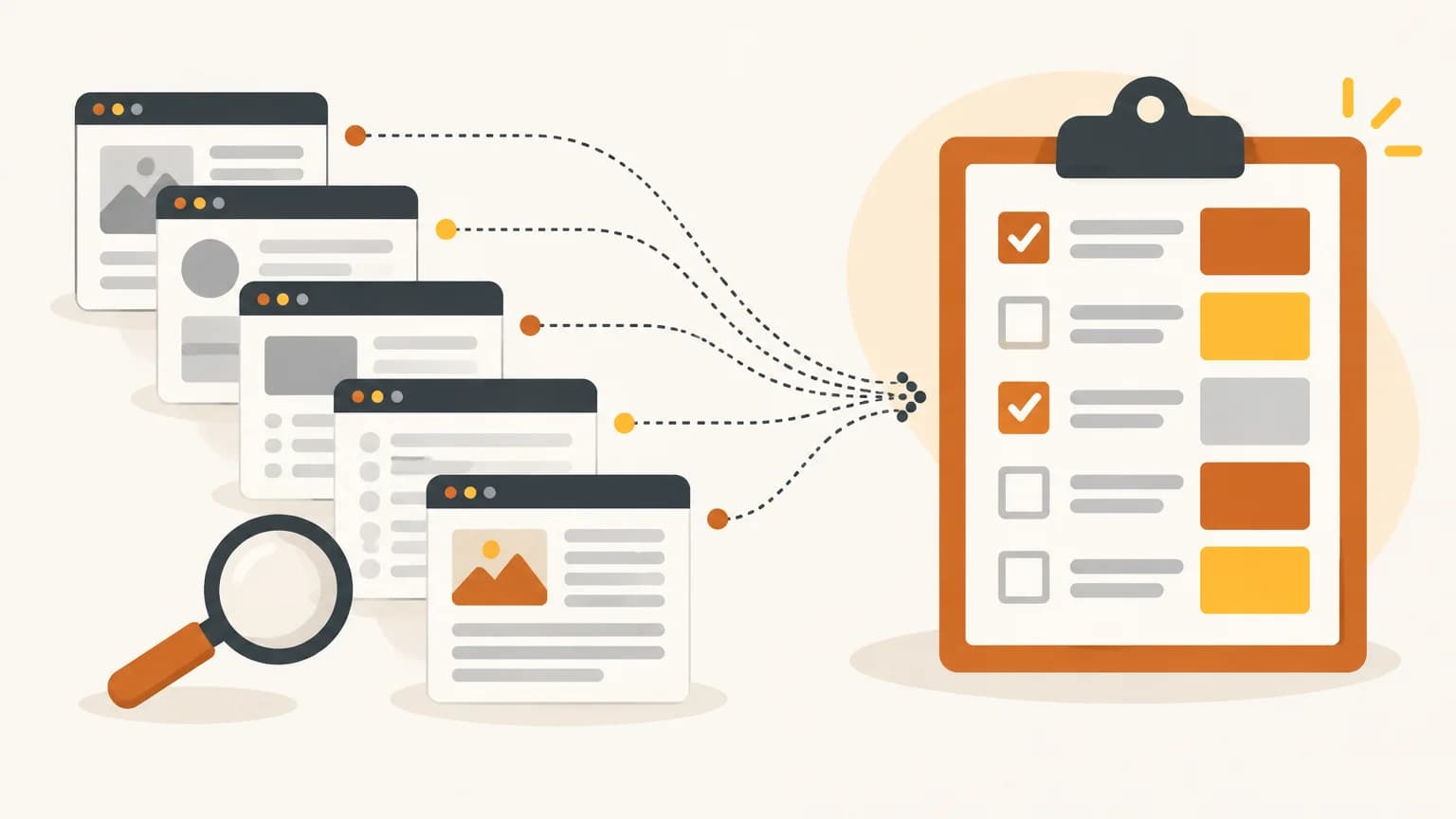
An SEO content brief template is a plan of one to two pages you fill in before anyone writes: the search, the reader's task, the answer the article opens with, the elements most top-ranking pages share, and what your article adds that they lack. Build it from the top 5 Google results, then copy the template below.
A list of fields tells a writer what to cover. It doesn't say which elements a page needs to compete, or what yours can add that the ranking pages lack. The method here is the one our article engine follows for every article it writes, reduced to steps you can do by hand with a browser and a spreadsheet.
What should a content brief decide?
A brief is a list of decisions, made once, so the writer doesn't have to guess. A useful one settles nine things:
- The search. One primary search, plus only the secondary searches the same page can answer.
- Whether the search wants an article at all. Some searches are answered by tools, product pages or maps.
- The reader's task. What they are trying to get done and what they do next.
- The deliverable. What they expect to walk away with: a number, a table, a checklist, a decision.
- The direct answer. The sentence or two the article opens with, with its figures and where they come from.
- The table stakes. The elements most ranking pages have. A page without them loses.
- The information gain. What your article adds that the ranking pages don't have.
- The facts only the business can supply. Prices, process, local rules, its own numbers.
- Length, title, links and the next step. Set by the search, not by habit.
Points 6 and 7 are where most briefs are thin, so most of the steps below spend their time there.
Step 1: Check that the search wants an article
Search the primary keyword in a private window and count how many of the first 10 results are articles (blog posts, guides, explainers). Tools, product pages, booking pages, marketplace listings, template galleries and social posts don't count.
If fewer than 3 of the 10 are articles, the results show that searchers want something else, and a blog post will struggle however good it is. Pick a different search, or build the kind of page that ranks. Our planner applies this rule to every topic it plans.
Step 2: Read the top 5 and list the table stakes
Open the top 5 organic results that are articles. For each page, note:
- Its headings (H2 and H3).
- Every table, list, checklist, calculator or template it offers.
- The figures it gives for the main question (ranges, defaults, prices, times).
- What it does badly: outdated, generic, padded, or missing the practical detail.
Then put the elements in rows and the five pages in columns, and tick where each element appears. This coverage grid is the core of the brief.
How to decide what counts as table stakes. A simple rule works well:
- A section-type element (a definition, a "why it matters" section, a list of steps) is table stakes when 3 or more of the 5 pages have it.
- An answer artefact (the direct answer, a figures table, a size chart, a template) is table stakes when 2 or more have it, because it is what searchers came for.
- Keep the list to about 6 elements. A longer list can't be covered well in one article, and the writer ends up chasing one more element instead of answering the question.
Everything else the pages have, including elements that met the bar but didn't fit in the 6, is a differentiator: borrow it if it helps your reader, skip it if not.
Figures that two or more ranking pages agree on are consensus figures. They belong in your article as common guidance ("most installers quote [range]") even when you can't give a single source for them, because a reader who doesn't find the expected number goes back to the results.
Also note the follow-up questions the pages answer and the ones in "People also ask". Google says its AI Overviews and AI Mode may use a "query fan-out" technique, running several related searches to build a response, and that there are no additional requirements or special optimizations to appear in them. A brief that lists those follow-up questions, each answered in its own clearly headed passage, serves both the classic results and the AI answers.
Step 3: Add information gain from five sources
The coverage grid tells you how to match the top 5. Information gain is how you beat them: something useful your article has that the ranking pages don't.
Google's helpful content guidance asks the question directly: "Does the content provide substantial value when compared to other pages in search results?" It also asks whether content that draws on other sources avoids "simply copying or rewriting those sources". A brief built only from the top 5 produces exactly that rewrite, unless it plans something new.
In SEO, the term is usually traced to a Google patent, Contextual estimation of link information gain (granted June 7, 2022), which describes a score "indicative of additional information" in a document "beyond information contained in documents that were previously viewed by the user". A patent doesn't prove Google ranks pages this way. The helpful content questions above are the part Google says out loud.
A small business usually has more information gain than it thinks. Five sources cover most of it:
| Source | What it looks like | Example for a local plumber |
|---|---|---|
| Your site's own facts | Product specs, prices, service areas, guarantees, process steps already on your pages | The call-out fee and guarantee from the services page |
| Owner answers | Short, specific facts only the owner knows | "Which water heater brands do you install most?" |
| Local consensus figures | Rules, prices or timings that local pages for your area agree on | Permit requirements two local pages state for your city |
| Worked examples | A calculation with every assumption stated | Yearly running cost of a 50-gallon tank at your local energy rate |
| Original data | Counts from your own records, a small test, a tally | How many of last year's repair calls were for the same fault |
Original data doesn't need to be a survey. Google's guidance on reviews suggests sharing "quantitative measurements about how something measures up" and evidence of your own experience, and a tally of your own jobs or orders does the same for a how-to article.
What isn't information gain. A credential is not information gain. "Attorney-reviewed", "certified technicians" or "20 years in business" tell the reader who wrote it, not anything new about the question. More words aren't information gain either, and neither is a rephrased version of the consensus. Our planner rejects any topic whose only planned edge is a credential.
Step 4: Write the answer contract and the page spec
Two short pieces turn the research into instructions.
The answer contract is the opening the article must deliver: one or two sentences that answer the search, with the figures and where they come from. For a plumber's article on water heater lifespan, it would read: "Most tank water heaters last [range from the consensus figures], and [the sign that one is failing]," with each figure traced to the pages that give it. If the writer meets this contract in the first 100 words, the reader has their answer before they scroll.
The page spec maps every table-stakes element to the section that delivers it, and gives every section a concrete deliverable instead of a topic. "Section 3: water heater lifespan" is a topic. "Section 3: lifespan table by heater type, with the signs each one is failing" is a deliverable a writer can't miss.
If you deliberately leave a table-stakes element out, write down why (no source you can verify, needs a tool you can't publish, wrong for your business). An omission with a reason is a decision. An omission without one is a gap the reviewer will find later.
The SEO content brief template
Copy these two tables into a document or spreadsheet, or download the template as a spreadsheet file (CSV) with both parts ready to fill in. The first is the brief header, the second the page spec.
Part 1: Brief header
| Field | What to write |
|---|---|
| Primary search | The one search this article must rank for |
| Secondary searches | Only searches whose top results overlap with the primary's |
| Article check | How many of the top 10 are articles (needs 3 or more) |
| Reader and task | Who is searching, what they want done, what they do next |
| Expected deliverable | Number, table, checklist, template, decision |
| Winning format | How-to, comparison, list, explainer, cost guide |
| Direct answer | The 1-2 sentence opening, with figures and their source |
| Table stakes | Up to 6 elements, each with its count (for example 4 of 5) |
| Consensus figures | Figures 2 or more top pages agree on |
| Gaps in the top 5 | What they get wrong, leave out or explain badly |
| Information gain | Each element and its source (site fact, owner answer, local figure, worked example, original data) |
| Questions for the owner | Up to 3, one fact each, about 15 words |
| Follow-up questions | The related questions to answer in headings or the FAQ |
| Voice and form of address | The tone and you/we usage your site already uses |
| Who writes or reviews it | The person whose first-hand experience the article draws on |
| Length range | The depth the top results need, not a fixed word count |
| Title and description | Draft title and meta description |
| Internal links | 2 to 6 pages on your site, with the anchor text |
| Sources to verify | Pages the writer must open and check before citing |
| Next step for the reader | The one action at the end |
Part 2: Page spec
| Section heading | Deliverable | Table stakes it covers | Information gain | Sources or facts used |
|---|---|---|---|---|
| (opening) | The direct answer | Direct answer | ||
| FAQ | Answers to follow-up questions not covered above | |||
| Omitted on purpose | Element and reason |
Three notes on the header fields. On who writes or reviews it, the same helpful content guidance suggests judging content by "Who, How, and Why", starting with whether it is "self-evident to your visitors who authored your content". Name the person in the brief, and what they have done that the article draws on. On length, the same guidance asks whether you are writing to a word count because you heard Google prefers one, and answers "No, we don't." Let the depth of the top results set a range; our guide on how long a blog post should be covers how. On the title and description, Google says there is no limit on how long a <title> can be, but the title link is truncated as needed, and the same is true of meta descriptions in snippets. Put the important words first.
A filled-in example: the brief for this article
Here is the brief this article was written from, filled in after reading the five top-ranking articles for "content brief" in Google's US results on October 15, 2026.
Brief header (shortened)
| Field | Filled in |
|---|---|
| Primary search | content brief (about 260 monthly searches, keyword tool estimate) |
| Secondary searches | seo content brief template, what is a content brief |
| Article check | 7 of the 8 organic results on the first page are articles; the other is a template gallery (needs 3 or more) |
| Reader and task | A business owner or marketer who hands articles to a writer or a tool, and wants a brief that produces a better article |
| Expected deliverable | A template to copy, plus how to fill it in |
| Winning format | How-to with a template |
| Gaps in the top 5 | No rule for what counts as must-cover; 2 of 5 showed a completed brief; 1 of 5 asked for expert or first-hand input |
| Information gain | The coverage tally below (original data); the 3-of-5 rule and page spec format (from how our engine builds briefs); the five sources of information gain (worked list) |
The coverage tally
| Element | Pages with it (of 5) | Table stakes? | Where this article covers it |
|---|---|---|---|
| Copyable or downloadable template | 2 | Yes (answer artefact) | The template section and the CSV download |
| Target keywords | 5 | Yes | Template, "Primary search" and "Secondary searches" |
| Target audience | 5 | Yes | "Reader and task" |
| Goal or call to action | 5 | Yes | Template, "Next step for the reader" |
| SERP or competitor analysis | 5 | Yes | Step 2 |
| Tone and voice | 5 | Yes | Template, "Voice and form of address" |
| Word count | 5 | Differentiator (met the bar) | "Length range" note |
| Deadline or timeline | 5 | Differentiator (met the bar) | Omitted on purpose (see the page spec below) |
| Outline or headings | 4 | Differentiator (met the bar) | Step 4, the page spec |
| Internal links | 4 | Differentiator (met the bar) | Template, "Internal links" |
| Search intent | 3 | Differentiator (met the bar) | Step 1, and "Reader and task" |
| Gaps or a fresh angle against competing pages | 3 | Differentiator (met the bar) | Step 3, and "Gaps in the top 5" |
| A completed example brief | 2 | Differentiator | This section |
| Expert or first-hand input | 1 | Differentiator | Step 3, "Owner answers", and "Who writes or reviews it" |
Twelve elements met their bar (3 of 5 for sections, 2 of 5 for the template, an answer artefact searchers came for), more than one article can cover well. Seven were on all five pages, so the template plus five of those seven became table stakes. Word count missed the cut because a length range replaces it, and deadlines because they schedule the work without changing what the article says. Everything else is a differentiator, and this article covers all of them except deadlines. That choice, written down, is what the page spec is for.
Page spec (shortened)
| Section heading | Deliverable | Table stakes it covers | Information gain | Sources or facts used |
|---|---|---|---|---|
| (opening) | What a brief is and how to build one, in the first paragraph | Target keywords | None | None |
| Step 2: Read the top 5 and list the table stakes | The coverage grid and the 3-of-5 rule | SERP or competitor analysis | The rule for what counts as table stakes | How our engine builds briefs |
| Step 3: Add information gain from five sources | A table of five sources, each with an example for a local plumber | None | The five sources (worked list) | Google's helpful content guidance, the information gain patent |
| The SEO content brief template | Two tables to copy and a CSV download | Template, target keywords, target audience, goal, tone and voice | The article check and the page spec | Google's guidance on titles, snippets and helpful content |
| A filled-in example | This brief: header, tally and page spec | None | The coverage tally (original data) | The top 5 articles, read October 15, 2026 |
| Omitted on purpose | Deadline or timeline: on all 5 pages, but it schedules the work and doesn't change what the article says | None | None | None |
Common mistakes to avoid
- Copying the top 5's outline and stopping. That produces a rewrite of what already ranks, which is the opposite of what Google's helpful content questions ask for.
- A word count instead of a deliverable. "2,000 words on water heaters" gives a writer nothing to aim at. "A lifespan table by heater type" does.
- Too many secondary searches. If a search has different top results, it wants a different page. Forcing it in weakens both.
- Information gain that is only a credential. Say what the article adds, not who signed it.
- Leaving business facts to the writer. A writer who doesn't know your call-out fee will either invent one or hedge. Ask the owner a short question instead, and leave the fact out until it's answered.
- Skipping the article check. No brief rescues a search where Google shows tools and product pages.
- No direct answer. A brief without an answer contract lets the writer warm up for three paragraphs before getting to the point.
How BlogAmplify builds a brief for every article
If you would rather not do this by hand for every post, this is the work BlogAmplify's SEO automation does before each article is written. It reads the live results for the search, fetches the top 5 ranking pages, pulls out their headings, tables and lists, and builds the coverage grid: the searcher's task, the expected deliverable, the table stakes and the differentiators. For local businesses with service areas (not online shops, software, marketplaces or publishers), it also reads up to 3 pages ranking for the search plus the business's first service area, so local figures that two pages share can be used as local consensus figures.
The outline then maps every table-stakes element to a section with a concrete deliverable, or records why it was left out, and sets the direct answer the article opens with. Facts about the business come from its own site first. When the topic is planned, what the site doesn't answer becomes up to 3 short, optional questions for the owner; anything still unknown when writing is left out, never guessed, and the article is written either way. The full process, including how sources are checked, is on our methodology page.
Frequently asked questions
What is the difference between a content brief and an outline?
An outline lists headings. A content brief decides why those headings exist: the search, the reader's task, the answer the article opens with, the must-cover elements, what the article adds that ranking pages lack, and which facts must come from the business. The page spec table in the template is where the brief turns into an outline.
How long should a content brief be?
One to two pages is usually enough. The brief header is one table, and the page spec has one row per section, usually fewer than 10 for an article of normal length. If a brief is longer than the article it describes, it is doing the writer's job instead of making the decisions.
Do I need paid SEO tools to build a content brief?
No. A private browser window, a spreadsheet and your own Google Search Console data are enough to read the top 5, tally what they share and find the searches your site already appears for. Paid tools add search volumes and speed, but the decisions in the brief are the same.
How is a content brief different from a content strategy?
A content strategy decides which topics to cover, for whom and in what order, across months. A content brief serves one article: one search, one reader task and the decisions that page needs. The strategy picks the search; the brief settles how one page competes for it.
When should you redo a content brief?
When the top results change enough to change its decisions: a different format leads the first page, a new element shows up on most of the top 5, or the figures they agree on move. Search the primary keyword again before updating an older article, and redo the tally if the top 5 are different pages.
Sources
- Creating helpful, reliable, people-first content, Google Search Central. Checked Oct 15, 2026.
- Contextual estimation of link information gain (US11354342B2), Google Patents. Checked Oct 15, 2026.
- AI features and your website, Google Search Central. Checked Oct 15, 2026.
- Influencing title links in Google Search, Google Search Central. Checked Oct 15, 2026.
- How to Write Meta Descriptions, Google Search Central. Checked Oct 15, 2026.
- How To Write Reviews, Google Search Central. Checked Oct 15, 2026.
Keep reading
SEO strategy
How Long Should a Blog Post Be for SEO? Let the Search Decide
There is no ideal word count. Read the top 5 results for your search, cover what they all cover, add what they miss, then stop. Here is the method.
· 9 min read

SEO strategy
Do Blogs Help SEO in 2026? An Honest Answer for Small Businesses
Do blogs help SEO in 2026? Yes, when posts answer real searches. Which posts AI answers cut clicks from most, and how to check your own blog.
· 11 min read

Shopify
Shopify SEO Checklist: 25 Checks for Store Owners
A Shopify SEO checklist of 25 checks: indexing, titles and H1s, product and collection pages, the blog, images and speed, and where to fix each one.
· 6 min read
Get a researched article on your blog every day
BlogAmplify plans your topics from your site's data, writes each article with linked sources and publishes it to Shopify, WordPress, Notion or your own site.
Card required. Free for 3 days, then from $99/mo. Cancel before then and pay nothing.